





- 30-Day Money-back Guarantee
- Free Еmail, SSL, CDN and Backups
- Support available 24/7/365 via Phone, Chat, Tickets and Knowledge Base

- 30 Day Refund Policy
- Free Domain, Free SSL, Free CDN
- Support available 24/7/365 via Phone, Chat, Knowledge Base and Blog
SiteGround vs Bluehost: Quick Summary
Bluehost wins in the overall comparison thanks to strong performance, fast loading speeds, and flexible hosting options.
It offers shared, VPS, and dedicated plans starting at $2.49/month, with unmetered bandwidth, a free domain, SSL, and solid 24/7 support.
SiteGround still stands out for daily backups, enhanced security, an intuitive control panel, and global server reach, which is great for beginners and users who put reliability and safety first.
In this SiteGround vs Bluehost comparison, we’ve broken down features, pricing, performance, and support to help you choose the best host for your needs.
SiteGround vs Bluehost: Overview
Before we dive into details, here’s an overview of what these providers are all about.
Bluehost Profile
Bluehost has been around since 2003, starting out in Provo, Utah. Today, it powers over 2 million websites across the globe. The company offers a wide range of hosting options: shared hosting, WordPress hosting, virtual private server (VPS) hosting, dedicated hosting, and WooCommerce hosting.
On top of that, Bluehost also offers professional marketing services to help businesses grow online.
SiteGround Profile
SiteGround started in 2004 in Sofia, Bulgaria, and has grown steadily ever since. Today, it hosts around 2.8 million domains worldwide and has a team of over 500 employees ready to support its users.
With data centers spread across four continents and a reported 99.7% customer happiness rate, it’s clear that many users are happy with what SiteGround has to offer.
1. Hosting Features and Services Comparison
Bluehost Features
Bluehost’s shared hosting plans and WordPress hosting plans are similar. You get unlimited bandwidth and up to 100GB of NVMe storage space. You also get a free SSL certificate and a free domain on every plan. But the only downside is that daily backups are not available on the basic plan.
The dedicated hosting plan starts at 1TB of HDD storage, and it offers you up to 3 TB for higher plans. The VPS hosting offers 100 GB of the standard plan and goes up to 450 GB of NVMe storage. The bandwidth is unmetered on all plans.
Bluehost gives a one-click WordPress installation, a drag-and-drop website builder, free Cloudflare CDN service, and professional digital marketing services.
SiteGround Features
SiteGround allows you to transfer your WordPress site from another provider for free using its WordPress Migrator plugin.
SiteGround also includes free daily backups with every plan. It automatically saves your site every day and keeps up to 30 backup copies, so you’re covered if anything goes wrong.
SiteGround’s Cloudflare CDN service boosts your site speed by caching your content and delivering it from servers around the world. That way, visitors get your site from the location closest to them, which means faster load times.
When you’re ready to build your website, you can choose between WordPress and the Weebly drag-and-drop website builder. They are both included free of charge with every SiteGround plan.
2. Prices and Plans Comparison
Shared & WordPress Hosting Plans Comparison
Bluehost Shared Hosting and WordPress Hosting plans
Bluehost’s shared hosting and WordPress hosting plans offer the same features and pricing.
The Basic plan, starting at $2.49 per month,
- Supports one website
- 10 GB NVMe storage
- Includes a free CDN, a free domain, and SSL for the first year
The basic plan does not offer free backups, but it does provide free migration for WordPress websites within the first 30 days after signup.
The business plan is priced at $4.99 per month
- Supports up to 50 websites
- 40 GB NVMe storage
- Includes daily backups, domain privacy, and malware scanning for the first year
eCommerce Essential plan, at $9.99 per month
- Supports up to 100 websites
- 100 GB NVMe storage
This plan is built for high-traffic websites. It includes all the features of the business plan but is tuned for more demanding performance needs.
Bluehost DEALS - Grab Your Discounts Today!
SiteGround Shared Hosting and WordPress Hosting plans
SiteGround’s StartUp plan, at $3.99/month,
- Offers 10 GB of web space for one website
- Up to 10,000 monthly visits
- Includes free domain, SSL, daily backups, and CDN
The GrowBig and GoGeek plans, at $6.69 and $10.69/month respectively,
- Expand to unlimited websites
- 20 GB for GrowBig and 40 GB for GoGeek
- Designed for higher traffic volumes
Both advanced plans include everything from the StartUp plan, but they’re built to handle larger or multiple websites, with extra emphasis on performance and security.
Reseller Hosting Plans Comparison
SiteGround’s reseller hosting plans start at $6.99/month, offering unlimited websites with 20 GB of web space. Each plan comes packed with WordPress-centric services, including free WP installation, auto-updates, a migrator plugin, daily and on-demand backups, free SSL, CDN, email, and improved security features.
For resellers needing more resources, plans scale up to $10.79/month for 40 GB web of space, with a premium option at $80.00/month offering over 40 GB, up to 1 TB.
All plans come with the same robust set of features, built to handle a wide range of hosting needs. They’re flexible and powerful enough to manage multiple client sites with ease.
Looking for reseller hosting? Check out these alternatives:
| Provider | Expert & User Reviews | |
|---|---|---|
 | Verpex Hosting Review | Visit Verpex Hosting |
 | Kamatera Review | Visit Kamatera |
 | ChemiCloud Review | Visit ChemiCloud |
VPS Hosting Plans Comparison
Bluehost’s VPS hosting plans start with the Standard package at $40.37/month and offer:
- 4GB RAM
- 2 core vCPU
- 100 GB of NVMe storage
- Unmetered bandwidth
- cPanel license
The Enhanced plan, at $56.75/month:
- Doubles the RAM to 8GB
- Increases storage to 200 GB NVMe
- 4 core vCPU along with the same features as the Standard plan
For more demanding needs, the Ultimate plan is available at $69.99/month, and features:
- 16 GB RAM
- 8 core vCPU
- 450 GB NVMe storage
- Unmetered bandwidth and a cPanel license
3. Website Performance Comparison (Uptime & Speed)
1.6s (LCP)
1.7s (LCP)
Uptime refers to how often your website is up and running for visitors, and it’s usually shown as a percentage. In web hosting, 99.99% uptime is considered excellent, but the closer you can get to 99.999%, the better. It means your site will be available almost all the time, with minimal downtime.
The speed of your website affects user experience. If a website has poor loading times and slow responses, visitors are more likely to leave and never come back again.
To compare how fast each provider really is, we ran speed and load time tests from multiple locations. These tests also gave us an overall performance grade for each host, which is another key factor to keep in mind.
SiteGround Uptime & Speed
SiteGround offers an uptime guarantee of 99.99%, which means that your website will be up and running 24/7, which is key for every website.
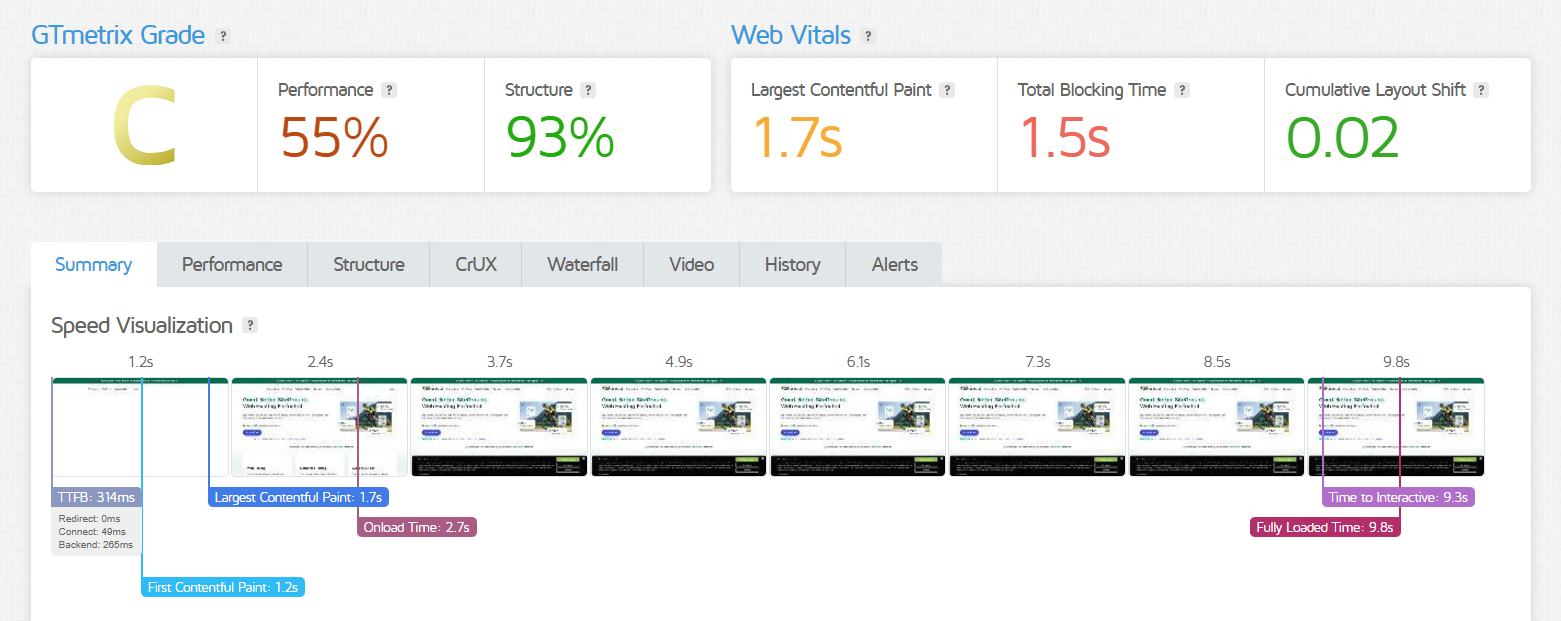
On the other hand, SiteGround’s server speed (Fully Loaded Time) on GTMetrix was 9.8s, and LCP came in at 1.7s.
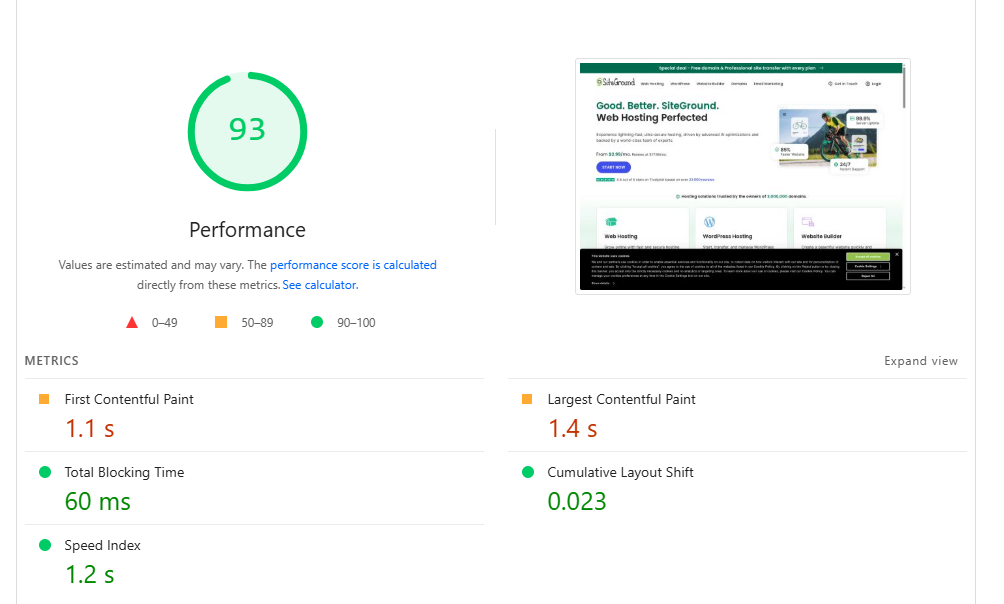
SiteGround had an overall performance score of 93% on the PageSpeed Insights test, with a speed index of 1.2s, which indicates smooth visual loading.
Bluehost Uptime & Speed
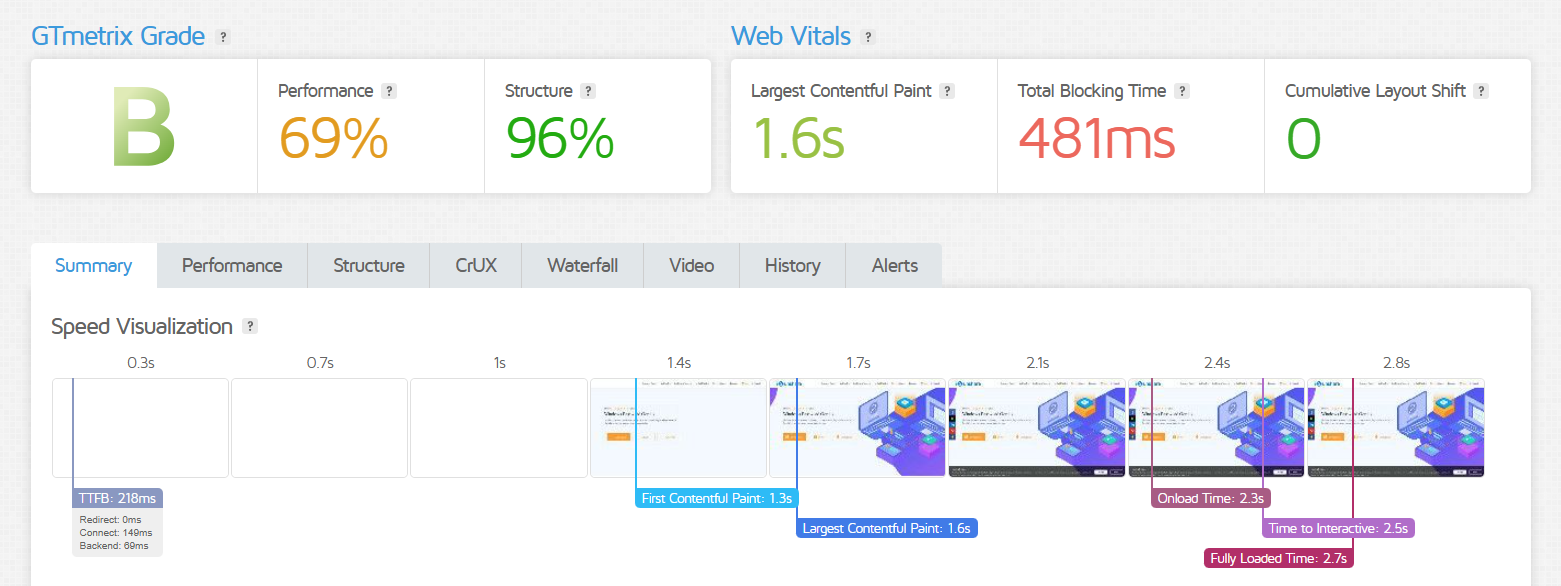
When it comes to speed, Bluehost had better performance than SiteGround. Its GTMetrix results showed Fully Loaded Time (2.7s) and LCP of 1.6s.
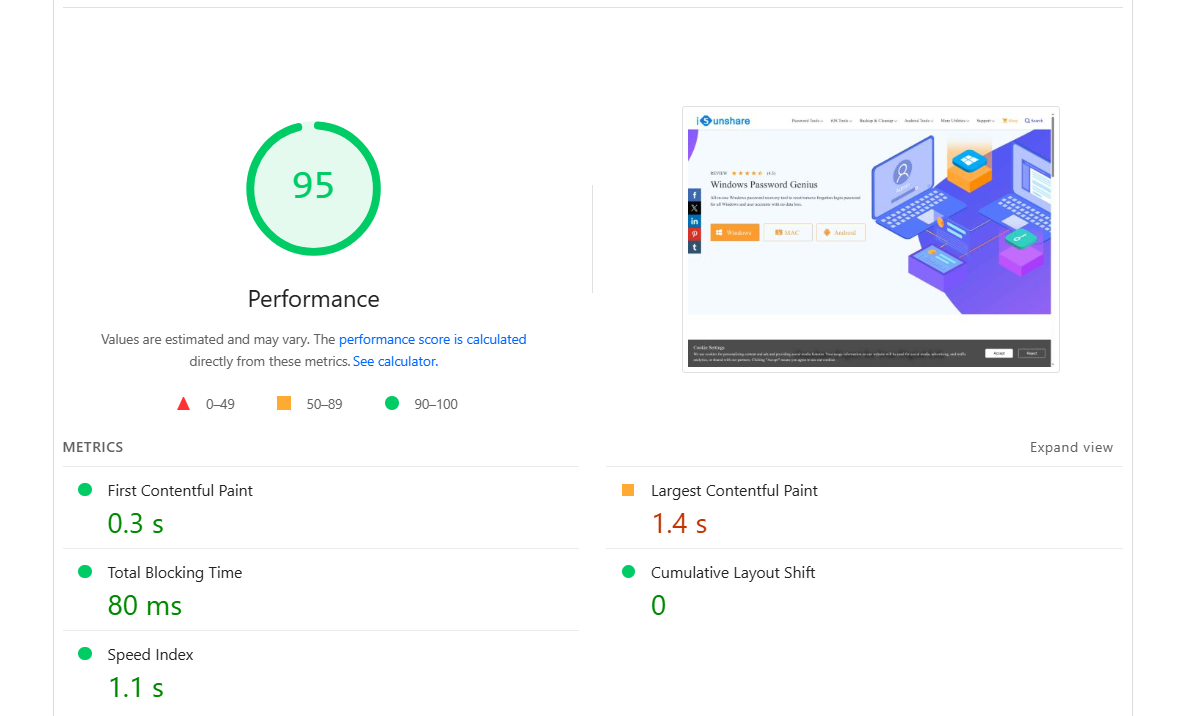
PageSpeed Insights test showed even better performance (95%), with a speed index of 1.1s, which is a great score that reflects fast visual load time.
4. Customer Support Comparison: Who’s Got Your Back?
Bluehost Customer Support
Bluehost offers excellent customer support, including 24/7 support, phone, live chat, email, and ticket support. Also, the provider has an extensive knowledge base where you can find numerous tutorials and articles related to their services.
Bluehost’s live chat is available via a button on every page.

I connected with an agent instantly after typing my question in Bluehost’s live chat. The agent asked for a few minutes to review my question.
My question was the following: What do I need to do to host my website with you?

The agent was friendly and patient and responded to all my messages within minutes.
In the end, I got answers to all my questions, but the information was basic and nothing beyond what you could find on the website by yourself.
SiteGround Customer Support
SiteGround support services include 24/7 phone support, live chat, and a ticket-based help desk, all designed to provide quick and efficient assistance.
When I was in the process of registering and setting up my SiteGround account, I ran into an issue and contacted its team through live chat.

I got an instant reply to my question, and the whole chat with the agent was friendly and pleasant.
They gave me a solution right away and walked me through every step I needed to fix my problem. The agent was patient, professional, and quick to respond throughout the entire conversation.
5. Ease of Use Comparison: Which Provider Is More Beginner-Friendly?
Both SiteGround and Bluehost are great for beginners and have easy-to-use dashboards. SiteGround uses its own Site Tools control panel, while Bluehost sticks with the popular cPanel.
Let’s take a look at how their dashboards, control panels, setup steps, and backup options compare to see which one is easier for newbies.
Bluehost Ease-Of-Use
Bluehost makes it easy to get started with a handy checklist right on your dashboard. You can tick off each step as you complete it to keep things on track.
The account management dashboard is super intuitive, with menus that are simple to navigate. Plus, if you have more than one website, Bluehost gives you a separate management area for each, which is a nice touch.

Bluehost uses the popular cPanel for control. To access cPanel, you will need to press the Advanced button on your dashboard, and you will easily find it.
Setting up a new website is straightforward and beginner-friendly, so you’ll breeze through the process without any stress.
If you’re moving a WordPress site, Bluehost offers free migration, but only within the first 30 days after signing up.
For backups, you get free daily backups for the first year on all plans except the basic one. That said, Bluehost suggests creating your own manual backups to be extra safe, which might be a bit tricky if you’re new to this.
SiteGround Ease-Of-Use
SiteGround’s dashboard contains tips and steps for website setup and optimization from the get-go. You’ll easily create your website by following those tips and steps, even if you’re new to the web creation process.

SiteGround has built its own control panel called Site Tools, and honestly, they’ve done a great job. It’s clean, intuitive, and really easy to use. The left-side menu is straightforward, so you won’t waste time hunting for what you need.
You can also pin your favorite tools for quick access, which makes managing your site even smoother.

When setting things up with SiteGround, you’ll get a tool that will help you install WordPress, Weebly, Joomla, or Drupal, and transfer an existing website. Also, with its Migrator plugin, you can migrate as many WordPress sites as you want with a few simple clicks.
SiteGround will automatically create backups for you and keep up to 30 copies of your account. You can easily find your backups in the Security category within your dashboard.
6. Privacy and Security Comparison: Who Will Make You Feel Safer?
Bluehost Security
Bluehost also offers excellent security features to its users, including:
- Free SSL security
- IP address blacklists
- Integration with SpamExperts
- Integration with SiteLock
- Password-protected directories
- SSH access
Still, if you want to get daily automated backups on the most basic plan, you’ll have to pay extra with Bluehost.
SiteGround Security
SiteGround offers robust security measures that make its shared hosting as secure as dedicated hosting, which is amazing. Its security measures include:
- Custom web application firewall (WAF)
- An AI-driven anti-bot system
- Free SSL security
- Automatic PHP and WordPress updates
- A fast server monitoring system that checks the server status every 0.5 seconds
- Unique account isolation
- Automatic daily backups
- On-demand backup option
All the security features mentioned above come with every SiteGround shared hosting plan, except for on-demand backups. Those are only included with the GrowBig and GoGeek plans.
8. Server Location Comparison
Having more server locations improves your website’s speed. If a hosting provider only has servers in Europe, for example, visitors from places like Australia or Asia might experience slower loading speeds and will not get the same experience as your European visitors.
That’s why it’s important for a web hosting provider to have servers around the world, so your site can load quickly for visitors no matter where they’re coming from.
SiteGround Server Location
SiteGround has six data centers located on four different continents, including:
- Iowa, USA;
- London, UK;
- Frankfurt, Germany;
- Singapore, Singapore;
- Sydney, Australia.
Bluehost Server Location
Bluehost has data centers across three continents, with a total of 23 locations in the US, China, India, and Europe.
Interestingly, even though it covers one less continent than SiteGround, Bluehost actually has more data centers overall.
SiteGround vs. Bluehost: Final Recommendations
If you’re still not sure which one to choose, here’s a quick refresher.
Why Choose Bluehost?
You should choose Bluehost if you need:
- Affordable prices: Bluehost offers low starting prices at $2.49 a month, which makes it a budget-friendly option with all necessary features for hosting a website.
- Gradual scaling: Ideal for gradual growth, Bluehost provides shared, VPS, and dedicated plans to scale your website affordably over time.
- Excellent support: 24/7 access via live chat, phone, email, and tickets, plus a detailed knowledge base.
When to Consider SiteGround?
SiteGround is an excellent web hosting provider, and you should choose it if you want:
- High-level performance: SiteGround guarantees 99.99% uptime and has servers on four continents for global reach and stability.
- Fast loading times: SiteGround’s speed tests show load speeds as fast as 1.25 seconds.
| Provider | Overview | Expert & User Reviews | |
|---|---|---|---|
 | Hostinger offers affordable shared hosting, VPS hosting, and cloud hosting, along with domain registration services. | Hostinger Review | Visit Hostinger |
 | Focuses on speed, security, and reliability and offers features like SSD storage, free website migration, daily backups, and a user-friendly control panel. | HostArmada Review | Visit HostArmada |
 | Offers strong uptime, fast customer support, and a 45-day money-back guarantee. | FastComet Review | Visit FastComet |
The Bottom Line
After comparing pricing, performance, scalability, and features, Bluehost comes out on top in the SiteGround vs. Bluehost matchup, though SiteGround still shines with its excellent support, beginner-friendly dashboard, and global server reach.

