





- 30 Day Refund Policy
- Free domain, Free site transfers, Free SSL certificate
- Support available 24/7/365 via Phone, Chat, Tweet, Knowledge Base

- 30 Day Refund Policy
- Free Domain, Free SSL, Free CDN
- Support available 24/7/365 via Phone, Chat, Knowledge Base and Blog

- 1-click domain name setup. 1-click to over 150 free apps
- Free SSL, Daily Backups
- Support available 24/7/365 via Chat, Phone and Knowledge Base
HostGator vs Bluehost vs GoDaddy: Quick Summary
After testing HostGator, Bluehost, and GoDaddy, HostGator comes out as the overall winner.
Its servers are super fast, the performance is solid, and many core features, like SSL, backups, and malware protection, stay free for as long as you keep your plan, which gives it a real edge over the others.
Bluehost is strong too, especially for WordPress users, offering reliable support, good performance, and big first-year discounts, but some of its features only stay free temporarily.
GoDaddy shines with its extra tools, like a website builder, logo maker, and global server locations, which make it great for beginners or small businesses that want an all-in-one platform, though its speed and shared hosting prices lag behind.
Overall, HostGator wins for fast, reliable hosting with long-term value, while Bluehost and GoDaddy have their own perks that make them worth considering depending on your needs.
HostGator vs Bluehost vs GoDaddy: Overview
HostGator Profile
HostGator is a US-based hosting company with customers around the world. It offers shared, WordPress, reseller, VPS, and dedicated hosting, plus a drag-and-drop website builder and domain registration.
You’ll also find extras like website design, backups (CodeGuard), PPC marketing, SiteLock, Google Workspace, SEO help, and an affiliate program. Prices are competitive, and support and performance are both solid.
Bluehost Profile
Bluehost is a well-known web hosting provider with localized sites like Bluehost.in and Bluehost.ch. It offers shared, WordPress, cloud, VPS, and dedicated hosting, plus online store options and business email.
You’ll also find extras like web design, marketing services, an affiliate program, and tons of WordPress resources.
Bluehost stands out for its official WordPress.org endorsement and big discounts for new users.
GoDaddy Profile
GoDaddy is a one-stop shop for hosting, domains, and related services. It offers shared, WordPress, and VPS hosting, along with domain registration, transfers, auctions, and even a domain broker service.
You’ll also find a website builder, design services, SSL certificates, SEO help, and eCommerce plans. GoDaddy includes handy free tools too, like a digital marketing suite, logo maker, business name generator, and content creator.
1. Hosting Features and Services Comparison
HostGator Features
HostGator includes unlimited bandwidth, SSD storage, basic email, pre-installed WordPress, and malware scanning with all its shared hosting plans. Storage ranges from 10GB on the entry plan to 100GB on the top-tier one, which makes these plans a good fit for small businesses.
Online stores can also use these plans thanks to built-in ecommerce tools, but those that need more power may want to consider VPS hosting.
Every plan comes with an SSL certificate and domain registration, both free for the first year. After that, they renew at standard rates.
Mid- and top-tier plans also include free Cloudflare CDN and more vCPUs. The highest-tier plan adds daily backups and domain privacy, again, free for the first year, then charged annually.
Bluehost Features
Bluehost offers NVMe storage, live chat, free CDN, and custom WordPress themes across all plans. You also get a free domain, SSL, and professional email, but only for the first year. Phone support isn’t available on the entry plan.
Mid-tier plans add malware scanning, domain privacy, and daily backups. Domain privacy and backups are free for the first year, then renew at regular rates.
The top-tier plan is built for eCommerce, with free tools like store analytics, shipping labels, gift cards, product search, and customer accounts.
There’s also a new CLOUD plan aimed at WordPress enterprise users. It includes 225GB storage, hosting for up to 50 domains, 150 vCPU power, and priority support.
GoDaddy Features
GoDaddy includes the same core features on all plans, NVMe storage, a free domain, WordPress migration tools, and a 30-day money-back guarantee. SSL and domain registration are free for the first year, but only mid- and top-tier plans let you keep the SSL for free after that.
Each plan has its own limits. The entry plan supports one website and 10GB of storage. The next tier bumps that to 25GB storage.
The higher-tier plan allows 10 websites and 50GB of storage.
2. Prices and Plans Comparison
Shared Hosting
HostGator starts off as one of the pricier options, but once you factor in other plans and renewals, it often ends up being the cheapest overall.
Bluehost sits in the middle. Just keep in mind that its low entry prices are heavily discounted, and many features renew at full price after the first term.
GoDaddy may seem more expensive upfront, but it can work out cheaper over time due to lower renewal rates.
VPS Hosting
For VPS hosting, GoDaddy leads with its very affordable plans. Even looking at specs and renewal costs, its top-tier plan stays the cheapest.
HostGator doesn’t win on entry price but offers better renewal rates. When it comes to specs, HostGator and Bluehost prioritize storage, while GoDaddy focuses more on RAM and CPU power.
Dedicated Hosting
HostGator and Bluehost match each other on dedicated server pricing, specs, and discounts. The only difference is that HostGator uses HDD drives, while Bluehost offers SSD options.
Unlike these two, GoDaddy doesn’t offer dedicated servers.
3. Website Performance Comparison (Uptime & Speed)
HostGator Uptime & Speed Test
HostGator delivers solid performance with fast load times and excellent responsiveness.
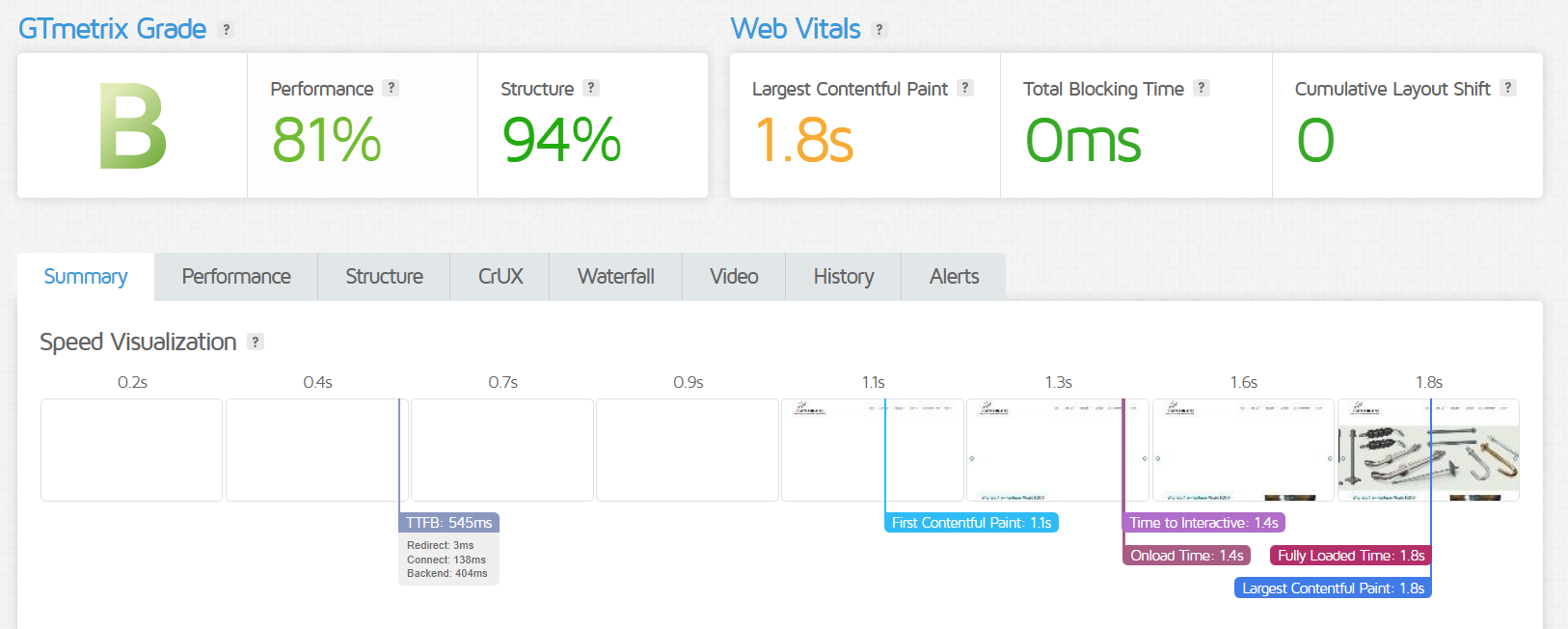
- GTmetrix Grade (B): This is a solid, above-average grade. It indicates that the site performs well, but has some opportunities to improve further to reach an ‘A’ grade.
- Performance Score (81%): A good score that shows the website is relatively fast and efficient, though not perfectly optimized.
- Structure Score (94%): This is an excellent score. It means the website’s code and setup follow best practices, which provides a strong foundation for good performance.
- Largest Contentful Paint (LCP) (1.8s): An excellent score, as it is well below the recommended 2.5-second threshold. This means the main content of the page loads very quickly.
- Total Blocking Time (TBT) (0ms): A perfect score, indicating the site is highly responsive and ready for user interaction without any delays.
- Cumulative Layout Shift (CLS) (0): Also a perfect score, meaning there are no unexpected visual shifts on the page as it loads, whch provides a stable and professional user experience.
- Fully Loaded Time (1.8s): This is a very fast total loading time that shows that the entire page, including all its resources, is ready for use in under two seconds.
Bluehost Uptime & Speed Test
Bluehost shows good overall performance, with strong user experience metrics and quick loading.
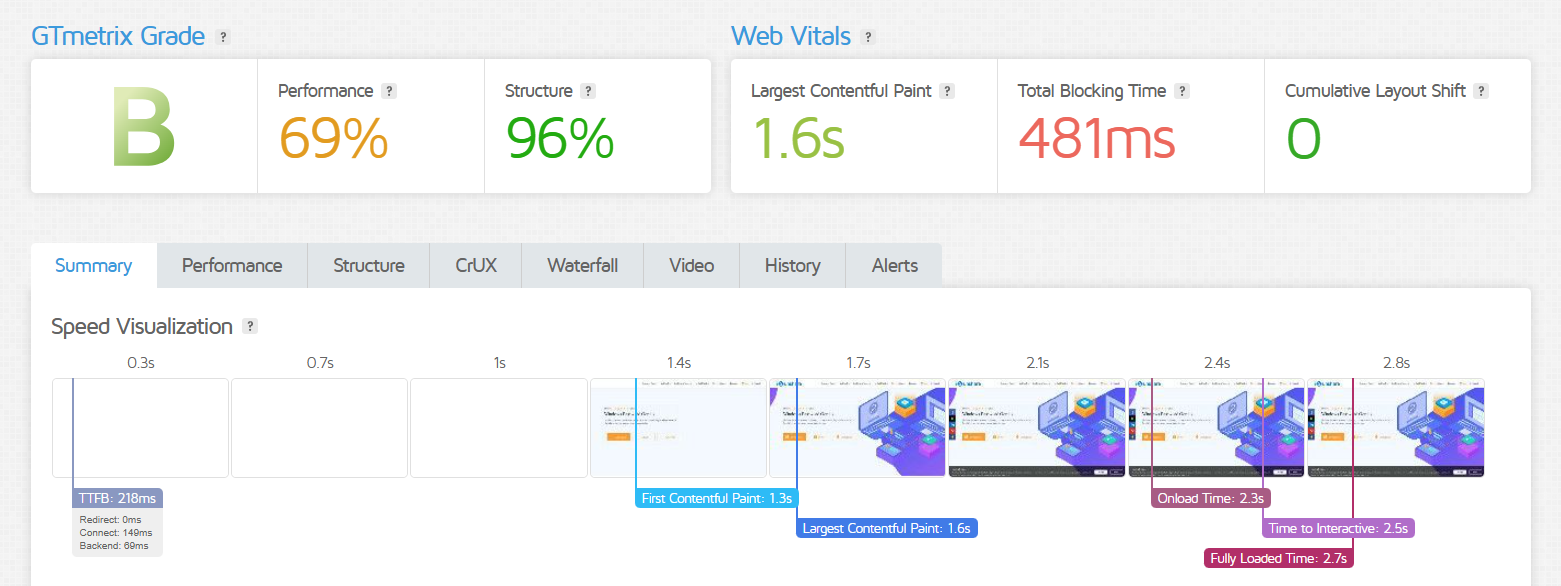
- GTmetrix Grade (B): This is a solid, above-average grade, but not perfect. It indicates the site performs well, but could be faster.
- Performance Score (81%): This is good, but suggests some optimizations are needed to improve loading speed.
- Structure Score (94%): This is an excellent score, showing the website’s code and setup are well-organized and follow best practices.
- Largest Contentful Paint (1.8s): This is a great score, well within the recommended 2.5-second limit. It means the main content loads quickly for users.
- Total Blocking Time (0ms): This is a perfect score. It means the website is very responsive, and users can interact with it immediately.
- Cumulative Layout Shift (0): This is another perfect score, indicating that the page is stable and there are no unexpected visual shifts as it loads.
- Fully Loaded Time (1.8s): The entire website loads very quickly, providing a fast overall experience for visitors.
GoDaddy Uptime & Speed Test
GoDaddy’s site is functional but struggles with relatively slow loading times and room for improvement.
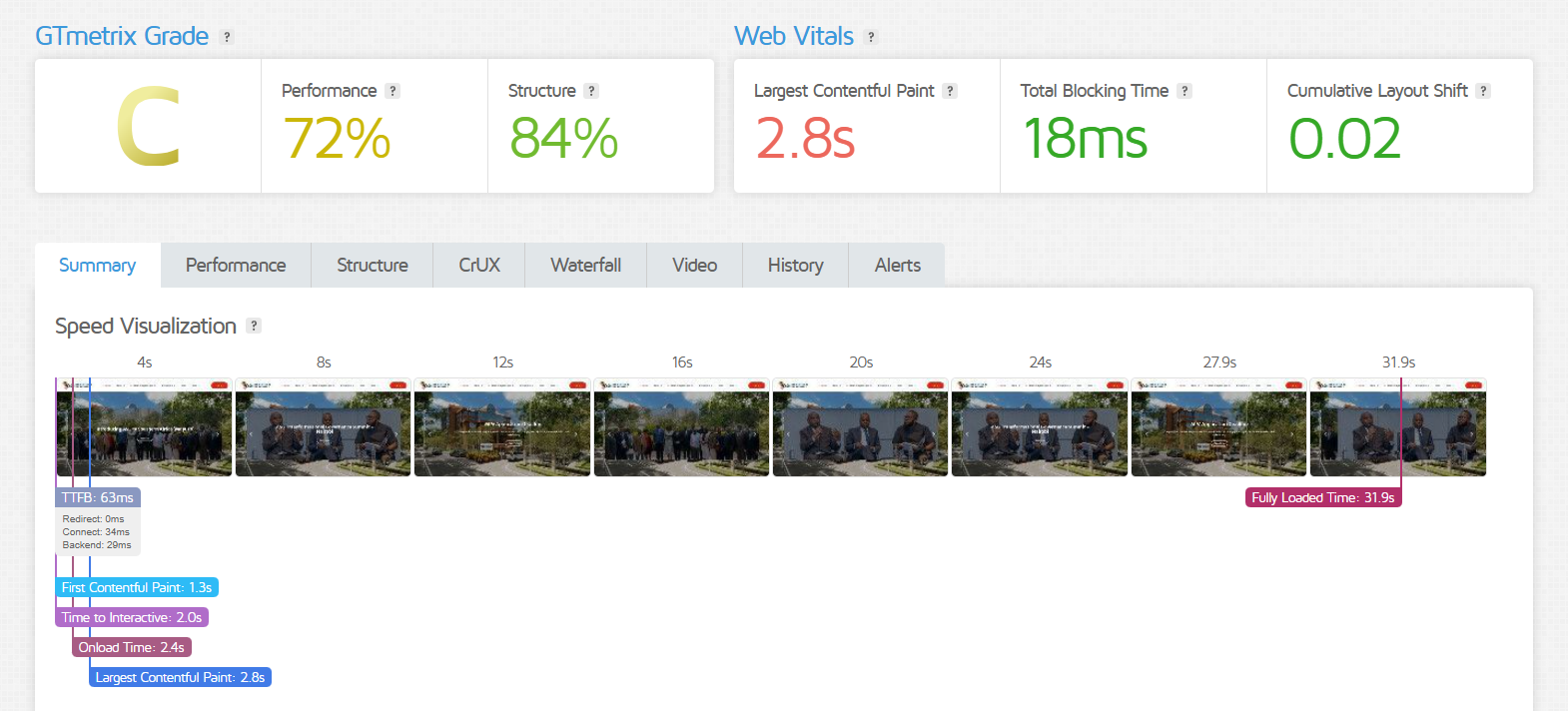
- GTmetrix Grade (C): A below-average grade, indicating that while the site is functional, its speed is not competitive.
- Performance Score (72%) & Structure Score (84%): A decent structure provides a good foundation, but the low performance score highlights many opportunities for optimization.
- Largest Contentful Paint (LCP) (2.8s): This is a weak point, as the main content takes slightly too long to load (just past the 2.5s ideal).
- Total Blocking Time (TBT) (18ms): A minor issue that can cause subtle delays in user interaction.
- Cumulative Layout Shift (CLS) (0.02): An excellent score, showing that the page layout is stable and doesn’t unexpectedly shift.
- Fully Loaded Time (31.9s): This is the most significant problem. A load time of nearly 32 seconds is excessively slow and will likely cause most users to leave the site.
4. Customer Support Comparison: Who’s Got Your Back?
HostGator Customer Support
HostGator offers live chat and phone support. I tried their live chat through the homepage and was impressed. After a quick automated prompt, I got connected to an agent named Harshitha.
She was patient and gave clear, helpful answers, explaining why the entry-level plan would work well for my small online store, expecting about 100 sales a month. I gave the support a 5/5.


Bluehost Customer Support
Bluehost offers live chat and phone support. I tried their live chat to ask about plans for a small online store.
After I mentioned I was looking at shared hosting, an agent named Johnson joined and suggested two options: the BASIC plan, which is cheaper but limited, and the CHOICE PLUS plan, which costs more but offers more resources.
He recommended the mid-tier plan since an online store might grow over time. Overall, the experience was smooth and helpful.


GoDaddy Customer Support
GoDaddy offers phone, live chat, and even text support in some countries. For this review, I used live chat.
A virtual assistant first asked if I wanted to buy something or get help with an existing service.
Then it asked me to sign in. I said I couldn’t, and got connected to a real agent. They answered my questions and asked for account details to help further. I thanked them and ended the chat.


5. Ease of Use Comparison: Which Platform is Easier to Use?
HostGator Ease of Use
HostGator is easy to use, thanks to its user-friendly control panel and dedicated WordPress plans. With 1-click installs, even beginners can set up a website quickly.
They also offer simple eCommerce tools for online stores. For advanced users, there are plenty of development options like unlimited MySQL databases and support for multiple programming languages.
Bluehost Ease of Use
Bluehost prioritizes ease of setup, particularly for WordPress users. So, it’s no surprise the web host is endorsed by WordPress.org.
Managing your site is simple with the Bluehost Account Manager, where you handle domains, emails, and hosting all in one place.
Plus, there’s 24/7 support and a huge knowledge base if you need help.
GoDaddy Ease of Use
GoDaddy makes things easy with plans that include handy add-ons and simple access. You get a drag-and-drop website builder, a logo maker, and website design services.
Plus, their dashboard called “The Hub” lets you manage everything in one place and automate backups, security, and updates.
Privacy and Security Comparison: Which Platform is More Secure?
HostGator Privacy and Security
HostGator includes solid security features like Positive SSL certificates, a firewall, and SiteLock malware protection.
You also get free DDoS protection, daily backups, and malware scans. Most of these stay free as long as you keep your plan, but domain privacy is only free for the first year.
Bluehost Privacy and Security
Bluehost includes SSL certificates and automated backups on most plans, but many features are free only for the first year.
The BASIC plan doesn’t offer backups, domain privacy, or malware scanning. DDoS protection and a web application firewall are only available on the top-tier CLOUD plan.
GoDaddy Privacy and Security
GoDaddy includes privacy and security features on all plans, like free unlimited SSL certificates, DDoS protection, and automated backups.
Their managed WordPress plans add extra WP security. If you’re running a store handling credit card info, GoDaddy’s PCI-certified products, like Online Store and WooCommerce hosting, are the way to go.
Server Locations Comparison
HostGator Server Location
HostGator’s servers are mainly in the US, but they use Cloudflare CDN to deliver fast speeds all over the world.
Bluehost Server Location
Bluehost’s main data centers are in the US. But if you use regional sites like Bluehost.in or Bluehost.ch, you can tap into data centers in the UK, China, and India.
GoDaddy Server Location
GoDaddy has data centers around the world, including the US, UK, Germany, Japan, Singapore, the Netherlands, Bulgaria, and India. This helps keep your site running fast, no matter where your visitors are.
Final Recommendations
Obviously, there is no one-size-fits-all in web hosting. Here are our recommendations.
Why Choose HostGator
Choose HostGator if you want:
- Essential web hosting features included in your plan
- Super fast loading speeds from anywhere in the world
- Basic email service for free in your plan
- Quick and helpful customer support
- Affordable long-term pricing with no hidden fees
When to Consider Bluehost
Bluehost is a good choice if you:
- Want big discounts to help launch your website
- Need the confidence of an official WordPress hosting provider
- Value reliable, local customer support
When to Consider GoDaddy
GoDaddy is a great fit if you:
- Run a business that wants a full range of services
- Are a startup looking for extra guidance and resources
- Don’t need heavy-duty hosting like dedicated servers
The Bottom Line
HostGator stands out with super-fast servers and affordable prices. It also includes more free features than many competitors. That said, its VPS plans can be pricey, so GoDaddy might be a better option if you want something more affordable there. GoDaddy goes beyond just hosting. It offers nearly everything you need to launch and run an online business. However, its shared hosting tends to be on the expensive side, and it doesn’t offer dedicated servers for heavy-duty sites or apps. Bluehost sits in the middle. It may not have any standout features, but it’s a solid choice, especially for WordPress users, thanks to its official recommendation and strong support. Plus, its dedicated servers match HostGator’s prices.

