Discover how Bluehost's Email Hosting can help bring your online ideas to life. With reliable performance, easy management, and a range of features, brand name offers a solution designed to support your goals and keep your website running smoothly.
Discover how Bluehost's Email Hosting can help bring your online ideas to life. With reliable performance, easy management, and a range of features, brand name offers a solution designed to support your goals and keep your website running smoothly.
As I dug into Bluehost Email Hosting, my first impression was that it’s crafted for professionals who want a straightforward yet powerful email solution.
From domain-matching email addresses to secure storage and productivity tools, it’s clear that Bluehost has packed this service with useful features.
With domain-matching email addresses, customizable storage from 25GB to 80GB, and seamless integration of calendars, contacts, and tasks, it promises a reliable platform for business communications.
It also has a user rating of 2.8 from 381 customer reviews in our Bluehost hosting review. This service shows potential but also leaves some questions.
Read on to see my complete take on what Bluehost Email Hosting brings.
Bluehost’s Black Friday sale is live: The More You Buy, The More You Save
Get 15% off one eligible hosting or AI product, 20% off two, or 25% off three or more on 12-month plans. Applied automatically at checkout, but only until November 30. Grab it now with HostAdvice’s Bluehost coupons and save even more.
Black Friday Offer: Up to 68% OFF Web Hosting (Use Code for an Extra 10% OFF + Free Domain)
Bluehost Black Friday 2026 offer: Buy 1 product for an extra 15% off, ...
Black Friday Offer: Up to 68% OFF Managed WordPress Hosting (Use Code for an Extra 10% OFF + Free Domain)
Bluehost Black Friday 2026 offer: Buy 1 product for an extra 15% off, ...
Black Friday Offer: Up to 59% OFF VPS Hosting (Use Code for an Extra 10% OFF Yearly Plans)
Bluehost Black Friday 2026 offer: Buy 1 product for an extra 15% off, ...
Bluehost Black Friday: Save an Extra 15%, 20%, or 25% on Top of Regular Discounts
Get 15% off one eligible hosting or AI product, 20% off two, or 25% of...
Buy .com domain at just $1.08/month ($12.99 for 1st year)
Buy .com domain at just $1.08/month ($12.99 for 1st year)
30 Days Money-Back Guarantee
30 Days Money-Back Guarantee
Bluehost Email Hosting Pros and Cons
Pros
Boosts credibility with domain-matching email
Ad-free inbox for focused communication
Calendar, contacts, and tasks integration
Up to 80GB storage for large files
Syncs across all devices seamlessly
Multiple aliases for organized inboxes
One-click file and email encryption
Virus and phishing protection included
Email templates for custom branding
Affordable, full-featured email solution
Cons
Renewal rates are higher than the initial price
Limited storage in the basic plan
Bluehost
Bluehost offers a range of packages and features that prioritize adaptability and performance – with shared, VPS, and dedicated hosting servers that all focus on WordPress-specific optimization.
Bluehost Email Hosting offers two plans tailored for businesses and professionals.
The plans include Professional Email and Professional Email Plus—each designed to provide secure, ad-free email with improved productivity and seamless device synchronization features.
However, it’s important to note that Bluehost’s email hosting plans do not have a standalone 30-day money-back guarantee, unlike their other hosting services. If you purchase only the email hosting plan, you won’t have the option for a refund if you decide it’s not the right fit.
However, if you purchase a general hosting plan that includes email hosting (such as WordPress hosting), you’ll be eligible for a 30-day refund on the hosting portion, which allows you to test the email features indirectly. Keep in mind, though, that any domain registration and setup fees are non-refundable, even with the hosting plan.
If you’re looking for a trial period with email hosting alone, this refund policy might be something to consider.
Payments are convenient, as Bluehost accepts all major credit cards and PayPal, with options to pay by check or wire transfer for renewals.
Here are what the plans offer:
1. Professional Email
The Professional Email plan is perfect for those needing a reliable, branded email experience without extensive storage needs.
This plan includes 25 GB of storage—plenty of space for routine business communications. You’ll also get 25 email aliases, allowing you to manage multiple addresses under one inbox.
The ad-free experience keeps your inbox clean, and you’ll benefit from spam and antivirus protection for safer communication. Professional Email also integrates a shared calendar, contacts, and tasks, simplifying team coordination right within your email dashboard.
You’ll also find essential email tools like document creation for text, spreadsheets, and presentations, along with a safe unsubscribe service.
Tip If your team is just starting with branded email, this plan offers excellent value for small to medium-sized businesses.
2. Professional Email Plus
The Professional Email Plus plan offers more robust features for growing teams or businesses handling larger volumes of email.
With 80GB of storage, you’ll have ample room for storing important files and ongoing projects. You also get 50 email aliases, doubling your capacity to create different emails for various departments or business functions.
This plan includes one-click encryption for emails and files, which adds a layer of security for sensitive information. It also retains the shared calendar, contacts, and tasks for improved workflow, and the rich webmail features provide a smooth user experience with email undelete capabilities and real-time anti-phishing protection.
Tip If your business frequently handles sensitive or confidential information, the Professional Email Plus plan’s encryption and larger storage make it a strong choice.
Bluehost
Bluehost offers a range of packages and features that prioritize adaptability and performance – with shared, VPS, and dedicated hosting servers that all focus on WordPress-specific optimization.
To assess Bluehost’s email hosting performance, I analyzed their main website using GTMetrix and PageSpeed Insights.
Although direct metrics for email hosting aren’t available, testing the website’s performance gives us a glimpse into the infrastructure behind their services, providing insights into speed, reliability, and potential user experience.
1. GTMetrix Results Overview
The GTMetrix analysis of Bluehost’s website revealed a Performance Score of 57% and a Structure Score of 78%, suggesting that while the design is well-structured, there’s room for optimization in loading speed.
The Largest Contentful Paint (LCP) time, a critical measure of load speed, was at 1.5 seconds, which reflects Bluehost’s commitment to quick initial loading—a positive indicator for their backend infrastructure.
However, the Total Blocking Time (TBT) of 2.2 seconds and the Time to Interactive (TTI) at 8.3 seconds indicate delays in processing content fully. A fully loaded time of 22.4 seconds suggests that while primary content loads fast, heavier elements might slow down the experience overall.
Key infrastructure takeaways: The low Time to First Byte (TTFB) of 233ms hints at a responsive server setup, which is crucial for email hosting.
Quick backend response times like this can translate to email retrieval faster and sending.
2. PageSpeed Insights Results Overview
On PageSpeed Insights, Bluehost achieved a Performance Score of 56, notably high scores in Accessibility (93) and SEO (92), focusing on usability and search optimization.
The First Contentful Paint (FCP) at 1.2 seconds and the Largest Contentful Paint (LCP) at 2.3 seconds are decent metrics that reflect the capability of Bluehost’s infrastructure to serve initial content quickly.
The Total Blocking Time (TBT) of 720ms and the Speed Index of 2.1 seconds suggest efficient initial load speeds but highlight areas for further improvement in fully interactive content. This efficiency in initial loading reflects favorably on Bluehost’s backend infrastructure and implies that similar responsiveness may be present in their email hosting service.
Overall Infrastructure Review
From the analysis, it’s evident that Bluehost’s infrastructure is built to handle high traffic and provides relatively quick load times, especially in terms of initial interactions.
This infrastructure supports the idea that their email hosting should offer reliable performance, especially for essential tasks like email retrieval and sending.
Bluehost
Bluehost offers a range of packages and features that prioritize adaptability and performance – with shared, VPS, and dedicated hosting servers that all focus on WordPress-specific optimization.
Bluehost Email Hosting offers a variety of support options to assist users with any questions or technical issues.
You can reach out 24/7 through live chat, phone, email, and even social media, so you’re never left alone in case you need help.
I tried each of these channels myself to see how well they support Bluehost’s email hosting service, and here’s my honest take on each.
1. Live Chat Support
The live chat option is easily accessible on any Bluehost page in the bottom right corner. When I clicked on it, I was quickly prompted with a few initial questions to narrow down my concerns.
This step took less than a minute, and I was connected to an agent named Dhanush shortly after. I appreciated how fast the initial connection was; within seconds, I could engage with someone live.
When I asked about the money-back guarantee, the agent promptly responded. The agent clarified that while there is a 30-day refund policy for hosting services, email hosting specifically doesn’t have a standalone money-back guarantee. However, you can use email hosting features within a larger hosting plan.
In terms of response time and support quality, the chat was quick to respond. Still, this is a reliable option if you’re looking for immediate help, especially for setup guidance.
2. Phone Support
I also tested Bluehost’s phone support by calling 888-401-4678. The call connected almost immediately, and I didn’t have to wait long to speak to an agent.
The support representative I spoke with was friendly and knowledgeable, and they provided clear answers to my questions about managing email hosting within the control panel.
The phone option was great for more personalized and detailed assistance, and I appreciated the human touch and thorough explanations. However, remember that international fees may apply if you’re calling from outside the U.S.
3. Email Support
For specific program or office queries, like media or affiliate program inquiries, Bluehost provides dedicated email addresses such as press@bluehost.com and affiliates@bluehost.com.
Though these emails are for specialized requests, seeing options available for media or affiliate-related questions is nice.
Impression: Useful for specialized inquiries, though not for general support.
4. Social Media Support
You can also reach Bluehost on popular social media platforms like Facebook, Instagram, X, LinkedIn, and Pinterest.
I tested their responsiveness by sending a message on Facebook. The response took a bit longer than the live chat and phone options, but within 20 minutes, I received a polite and helpful response.
Social media might be better suited for non-urgent questions, and it’s nice to know that you can reach out this way if you’re already active on these platforms.
Impression: Useful for non-urgent inquiries; response in less than an hour.
5. Knowledge Base Support
For users who prefer self-service support, Bluehost provides an extensive Knowledge Base packed with articles, guides, and tutorials to assist with various aspects of email hosting.
I found the Knowledge Base especially valuable for troubleshooting and setup guidance, as it covers everything from creating email accounts to managing storage and configuring spam filters.
Navigating the Knowledge Base is straightforward, with topics organized by category, making it easy to find the specific help you need without scrolling through unrelated information.
For example, I could easily locate step-by-step instructions on setting up email addresses and adjusting security settings, which saved time compared to waiting for live support.
Bluehost
Bluehost offers a range of packages and features that prioritize adaptability and performance – with shared, VPS, and dedicated hosting servers that all focus on WordPress-specific optimization.
I decided to explore the registration process and control panel setup to get a feel for how user-friendly Bluehost Email Hosting is.
Overall, I found the steps intuitive, with clear guidance along the way.
1. Registration
Signing up for Bluehost Email Hosting was a simple and straightforward experience. From the Bluehost homepage, I hovered over the “Email” option in the top menu, selected “Professional Email,” and was taken to a page where I could view the plan options.
Once I decided on the Professional Email plan, I clicked “Select” to move forward.
On the next page, I was prompted to choose the number of mailboxes. Bluehost makes this step easy by suggesting the number of mailboxes based on the needs of your organization, including general addresses like help@, admin@, or sales@. I noticed the pricing was shown as $1.49 per month for each mailbox during the first month, with a renewal rate of $2.49 per mailbox per month after that. I selected my desired number and continued to the next step.
Next, I was prompted to choose a domain name. Here, you have options to:
Use a domain you already own,
Register a new domain, or
Choose a domain later if you’re not ready to make a decision.
I opted to Choose Domain Later to keep things moving quickly.
The following page displayed a cart summary for the Professional Email plan. Here, I could see the plan duration (one year), the initial cost ($14.99), and a summary of any discounts or savings applied. Bluehost offers both annual and monthly billing options, which makes budgeting flexible. I reviewed the details and continued to checkout.
Finally, the checkout page appeared, where I filled in my contact, account, and billing information. Bluehost lets you pay via credit card or PayPal and use your billing address to keep things simple.
Before finalizing, I reviewed the order summary, which clearly listed any savings and my total cost.
With one last click on “Submit Payment,” my registration was complete.
The entire process was smooth and transparent, with helpful prompts at each stage. From selecting a plan to finalizing payment, Bluehost’s system makes it easy to start with professional email hosting, even if you’re unfamiliar with the process.
The clear steps, flexible payment options, and transparent pricing impressed me greatly.
2. Account Manager
Bluehost email hosting doesn’t rely on the typical cPanel interface. Instead, it offers a streamlined account manager designed to make managing professional email hosting simple and user-friendly.
So, after registering, I logged in using the account details I set up during registration and immediately accessed the tools available to set up and manage my professional email.
The Bluehost account manager is organized and intuitive. The side navigation menu on the left provides a straightforward path to everything I need, starting with the Email & Office tab, the primary email hosting hub.
From here, I can choose between Google Workspace and cPanel Email options depending on my preferred setup.
Note Bluehost also offers Google Workspace as part of its email services, giving users access to Gmail-based email and Google’s calendar, drive, and productivity apps. In the account manager, under the “Email & Office” tab, you’ll see two options: Google Workspace and cPanel Email. I chose cPanel Email, as it directly provides all the essential email hosting features through Bluehost without needing additional setup for Google’s suite.
Creating a New Email Account
Creating a new email account was quick and straightforward. Under Email & Office, I navigated to Email Accounts and clicked Create.
Here, Bluehost provided simple fields to customize each account:
I selected the domain name I wanted the email to be associated with.
I entered a username and set a secure password, with a handy Password Strength Meter to guide me.
I could also adjust the Mailbox quota for each account, setting the storage allocation based on my needs. For instance, I could start with the default 500 MB or choose to increase it if I anticipated high storage use.
The entire setup took just a few minutes, and Bluehost’s account manager provided clear feedback along the way, making the process smooth and accessible.
Managing Existing Email Accounts
Once my email accounts were set up, viewing and managing them was easy. Back in the Email Accounts section, I could see all active addresses and sort them by email address, username, or domain.
There were also options to delete accounts and make specific changes, such as adjusting the storage quota. The Manage button provided easy access to update storage limits, toggle unlimited storage, or change account passwords if necessary.
For password updates, the account manager even has a Generate Password feature, which suggests strong passwords—a great touch for enhancing security.
Deleting Email Accounts
Deleting an email account was just as straightforward. In the Email Accounts section, clicking Manage brings up an option to Delete the Email Account.
Bluehost warns that all emails associated with the account will be permanently deleted, ensuring there’s no accidental data loss. The straightforward layout of the account manager made it easy to find and use this feature without hassle.
Overall Ease of Use
The account manager in Bluehost Email Hosting is built with user-friendliness in mind. Whether creating new email accounts, adjusting quotas, or managing passwords, everything is accessible in a few clicks.
The clear layout and organized sections make navigating easy, even if you’re not tech-savvy. For those using Google Workspace, the account manager offers a seamless way to access these tools alongside professional email hosting.
Conclusion: Do I Recommend Bluehost Email Hosting?
After testing Bluehost Email Hosting, I can say it’s a solid choice for businesses and professionals looking for a straightforward, reliable email solution.
The setup process is refreshingly simple, and the account manager is designed with user-friendliness in mind, making it easy to create, manage, and organize email accounts.
I was particularly impressed by the thoughtful features like domain-matching email, ad-free inboxes, and security options, which include spam and phishing protection and even one-click encryption in the Professional Email Plus plan.
For small to medium-sized businesses and anyone wanting a professional email that’s seamlessly tied to their brand, Bluehost Email Hosting offers great value.
While it may lack some enterprise-level services’ advanced functionalities, its simplicity and effectiveness make it a dependable option for most users. Overall, I’d recommend Bluehost Email Hosting for those who prioritize ease of use, secure email management, and essential productivity tools without the need for overly complex setups.
Setup their agency hosting (formerly called Cloud) for my clients. Been running with no downtime for over 16 months now across 23 clients. The speeds are incredible and the uptime was my biggest surprise. Support has been great when I needed it, there was one time that the support agent couldn't resolve my issue and had to escalate it to someone over email. This issue was resolved a couple of hours later. Overall, the experience has been great, and the pricing beats what I was paying over at Flywheel for a similar agency hosting plan. I also have a couple of test accounts on their shared hosting product. This product has seen some great improvements over the past year and is quite impressive as well.
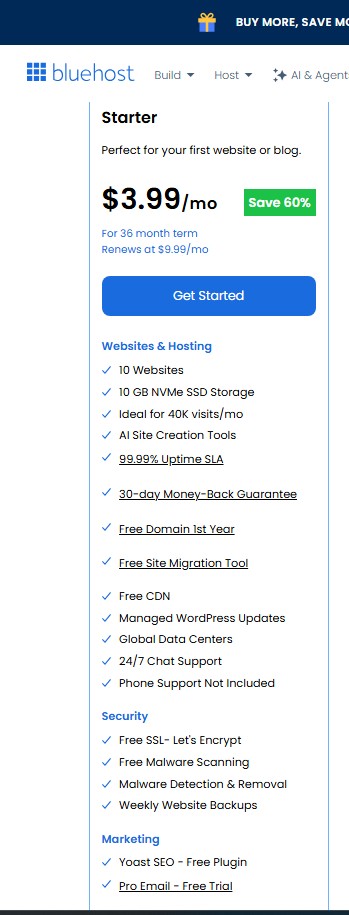
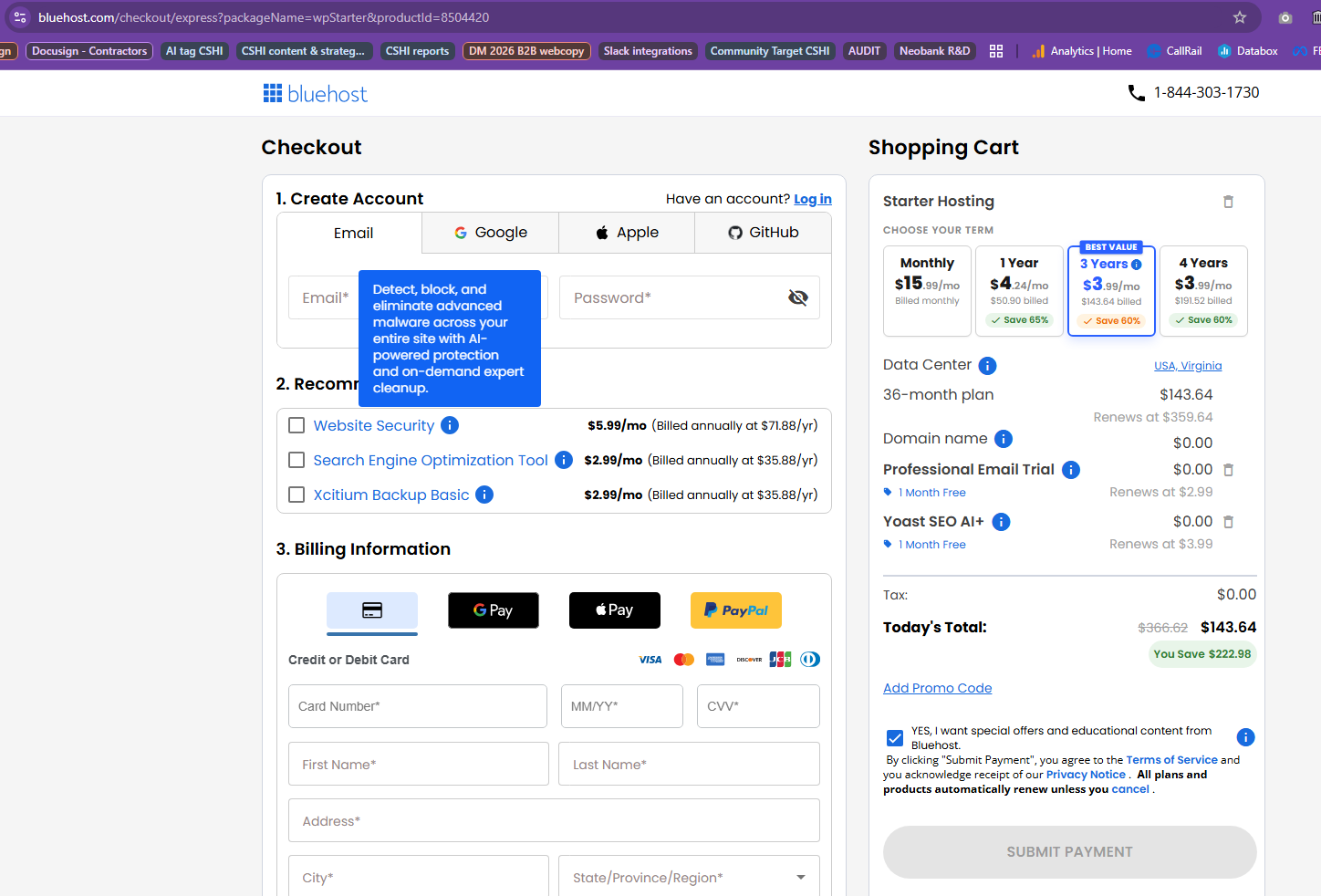
Dishonest prices and service offerings When looking at their packages, they include certain security and SEO plugin as "free". But when you go to checkout, the security features are not included as must be purchased as an "add-on". And the SEO plugin is free for 1 month, then automatically becomes a paid add-on. I called their sales team and reported the issue, and even offered to share the screenshots of the dishonest marketing and checkout. Their sales team told me there was nothing they could do about it, but would report the issue. So I waited a week and went back - same dishonest prices and service offerings. Took screenshots again. Very dishonest marketing - do not trust them, keep records.
Incompetent support team – zero technical expertise
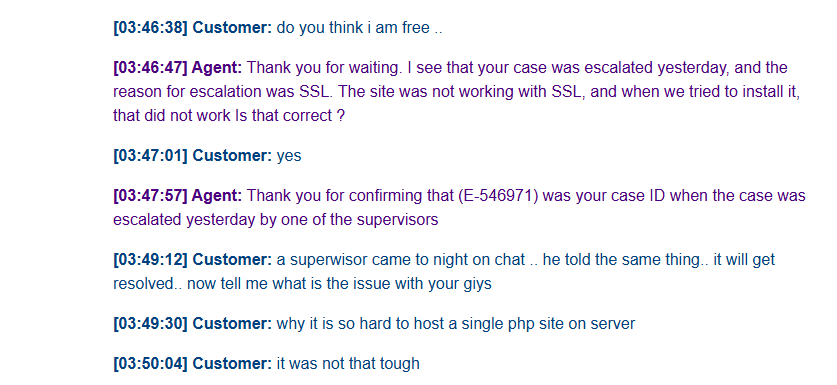
I bought hosting yesterday on bluehost and set up all by myself. It worked for a few hours, then someone from their team changed something (probably SSL) and the site went down. After 5-6 straight hours long on chat, they had no clue how to fix what they broke. The site was completely blocked and I was totally frustrated. Their support team is incapable — even the seniors just go through formalities without solving anything. If senior management or owner reads this: replace this team if you really want to grow. Otherwise they’re a waste of time and money. The team is completely incapable.
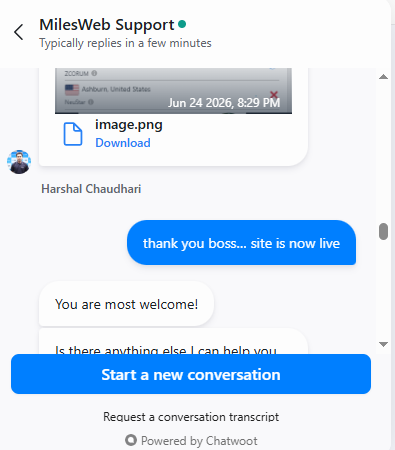
Today I warned them to fix the site or I’d host it somewhere else. They still failed to set up the domain correctly, so I asked the MilesWeb team for help. The support person named Harshal Chaudhari at MilesWeb helped me out, even though my hosting is elsewhere. I only have the domain with them. but the milesweb support person really impressed — provided the excellent support. I have posted my positive review on milesweb too.
I would recommend the community of this platform, You better to buy hosting related work anywhere else but not on bluehost. All the good reviews here look paid or only cover minor fixes.
VPS Down for 7 days because Bluehost console is not working. No answers, support, or accountability - or end in sight.
For the past 7 days, I've been locked out of my VPS because the web console is not functioning. I still have no resolution, no ETA, no meaningful explanation
We have not had incoming mail working for 2 days. Yesterday I phoned them to tell them our email was not being received. They made a few changes on the server and said that it would fix itself in the next 4 to 6 hours. Nothing changed. Next day, still no mail so I called again. After making more changes on the server and making us change all our passwords (13) they told me it would be fixed in 30 minutes. Nothing changed. I called back again and more changes were made on the server. I was told it would now take 24 hours for the changes to propagate. This will be three days our business is without any email. Not sure if your business could go that long with no email, but this is ridiculous. We are now expected to wait until tomorrow afternoon (the third day) to see if it is fixed this time. I'm not holding my breath, but I am researching a new hosting company.
I booked hosting on October 7, 2024 After 24 hours, I found my account not working with the company. I checked my site and found the site working without a problem. I thought it was a technical problem. I tried to log in to my account again on October 9 and found the same problem, but I added that the site was no longer working at all
For more than three days, my site is not working. My account with the company is not working. Whenever I contact technical support, they respond with canned responses. We are working to solve the problem. They will contact you soon. So far, the problem has not been solved at all. Every day, my site is down, which is equivalent to a financial loss. They deal with it coldly. I do not advise anyone, even a beginner, to deal with them
So far, my site is not working. I ignore and deal slowly with their technical support service, as well as leaking my private data by the company, as I find many after booking hosting. They contact me via email and under the name registered with their company to provide SEO, design, and other services, which is something that violates privacy
I think that if there is a negative rating or less than zero, they will deserve it
Complaint about Bluehost Support Staff Sybbale, Sneha, and Harshitha.
Complaint about Bluehost Support Staff Sybbale, Sneha, and Harshitha.
I am a professor of English at a Japanese university. I have used the Bluehost Hosting service for more than 20 years for my courses at two universities. My students use my Moodle website content as a core course tool.
On August 28, 2024, I was following the instructions in the Bluehost cPanel instructed me to update my outdated version of Moodle 4.2 to Moodle V. 4.4.2. After proceeding, the updating process froze before completing the update.
This has happened on previous occasions in the past years (I have used Bluehost Hosting for more than 20 years), and Bluehost Support has always been able to solve my problems under the same conditions. This year, after three attempts with three different Bluehost support people, they could not solve the problem as quickly as in past years. I tried to follow the same steps as in past years, but the Bluehost cPanel has changed since April 2023.
In fact, this year all three Bluehost people (Sybbale, Sneha, and Harshitha.) gave me the same generic ("canned") instructions to "DYI" and report the results to them. I have documented chat recordings if you want to read through the long, unsuccessful chat discussions.
This has been extremely frustrating and disappointing, especially since I have been using Bluehost for over 20 years. Sybbale, Sneha, and Harshitha are unknowledgeable and unenthusiastic about going above and beyond their minimal abilities to solve customer problems.
After 20-plus years, I am now in a panic about finding a new hosting service and setting up my Moodle website before the new semester commences in a couple of weeks. I hope and pray you avoid Bluehost and this exact situation. Fortunately I am having great success with my new hosting service Hostinger. The service is much more user friendly and the support staff have already provided me with understandable guidance to rebuild my website using their hosting service.
I hope I have helped someone avoid the same problem. Avoid Bluehost. It's cheap but widely known for POOR customer service. After 20 years, add me to that long list.
In the short time I've looked after a client who uses them I've seen: - The VPS server they use go down for days without any support - Support is clueless on tech support and just reverts to scripted responses or sending through help articles - No idea on plans, pricing and upgrades. Our plan was apparently legacy and we weren't able to upgrade without starting up a whole new account. We would then apparently get no refund on the old plan (which was only half through its term) and also no assistance migrating to the new account. Our account ran out of storage space and they offered us no solution to increase it. - Server constantly crashes and can't run our website with no explanation or help from support as to why.
There's much more but these are the highlights. Even if you're just looking for simple hosting I would steer well clear and give your money to a hosting company that actually cares about its customers.
Bluehost has been an horrible company to be attached to for the past 10 years. There was never a time I was happy with their service. You get stuck with these hosting companies due to the challenge of switching providers. I finally made the effort to backup all my sites and databases and finally escape their inept clutches.
God what a pain it has been trying to deal with this company. They are not proactive at all. Their support is very unskilled. They pull every trick in the book to prevent you from leaving. There are so many competitors with much better services that have been created over the years. Im happy to be with a capable company now in hostinger. They do everything right. I very strongly suggest not going with bluehost. You will regret it!
Domain-specific email uses your company’s website domain for email addresses. For example, if your website is www.bluehost.com, your domain-specific email could be yourname@bluehost.com. This promotes brand consistency and recognition and is highly recommended for businesses.
How does having a professional email boost credibility and trust?
Customers are more likely to trust and engage with businesses that present themselves professionally, including in their email communications. A professional email matching your domain name shows you are serious and committed to your brand.
Can one user have multiple email addresses?
Yes, users can have multiple email addresses or aliases with both Bluehost Professional Email and Professional Email Plus plans. This can be helpful for different roles or departments within a company. For instance, you could have addresses like sales@yourdomain.com, support@yourdomain.com, and admin@yourdomain.com all directed to one main inbox.
Will I be able to access my email from my mobile phone or tablet
Yes, Bluehost Pro Email syncs across devices so you can read and respond to emails from your computer, mobile phone, or tablet. You can manage your email wherever you are as long as you have an internet connection.
What are the main differences between Professional Email and Professional Email Plus?
While both plans offer comprehensive features for business email, Professional Email Plus includes:
More storage (80GB versus 25GB)
More email aliases (50 versus 25)
One-click email & file encryption
The additional features of Professional Email Plus offer more flexibility and enhanced security, which can be especially useful for larger teams or businesses that handle sensitive information.
HostAdvice.com provides professional web hosting reviews fully independent of any other entity. Our reviews are unbiased, honest, and apply the same evaluation standards to all those reviewed.While monetary compensation is received from a few of the companies listed on this site, compensation of services and products have no influence on the direction or conclusions of our reviews. Nor does the compensation influence our rankings for certain host companies.This compensation covers account purchasing costs, testing costs and royalties paid to reviewers.